> ## Documentation Index
> Fetch the complete documentation index at: https://mintlify.manicule.dev/llms.txt
> Use this file to discover all available pages before exploring further.
> For every page in one file, fetch https://mintlify.manicule.dev/llms-full.txt (large).
> To search and read these docs as tools, connect the MCP server at https://mintlify.manicule.dev/api/mcp.
> Every agent surface: https://mintlify.manicule.dev/.well-known/llms-manifest.json
# Osano (/integrations/privacy/osano)
Related: [Privacy integrations](/integrations/privacy/overview.md), [Transcend](/integrations/privacy/transcend.md)
> Integrate Osano with your Mintlify documentation site to manage cookie consent banners, privacy preferences, and regulatory compliance.
Add [Osano](https://www.osano.com/) cookie consent to your docs with a [custom JavaScript file](/customize/custom-scripts#custom-javascript) in your repository.
## Setup
Create an `osano.js` file in your docs repository with the following content:
```js title="Format"
var script = document.createElement("script");
script.src = "OSANO_SCRIPT_URL";
document.head.appendChild(script);
```
```js title="Example"
var script = document.createElement("script");
script.src = "https://cmp.osano.com/your-tenant-id/your-site-id/osano.js";
document.head.appendChild(script);
```
Replace `OSANO_SCRIPT_URL` with your Osano script URL. Your script URL is the `src` value in the code snippet that Osano generates. Your script URL always starts with `https://cmp.osano.com/` and ends with `/osano.js`.
## Troubleshooting
If your documentation pages aren't loading properly when using Osano's **Strict** compliance mode, you'll need to add Mintlify's domain to your allowlist to allow images and other assets to load.
In your Osano dashboard, go to **Scripts** → **Managed Rules**.
Add `.mintlify.site/` as a managed rule.
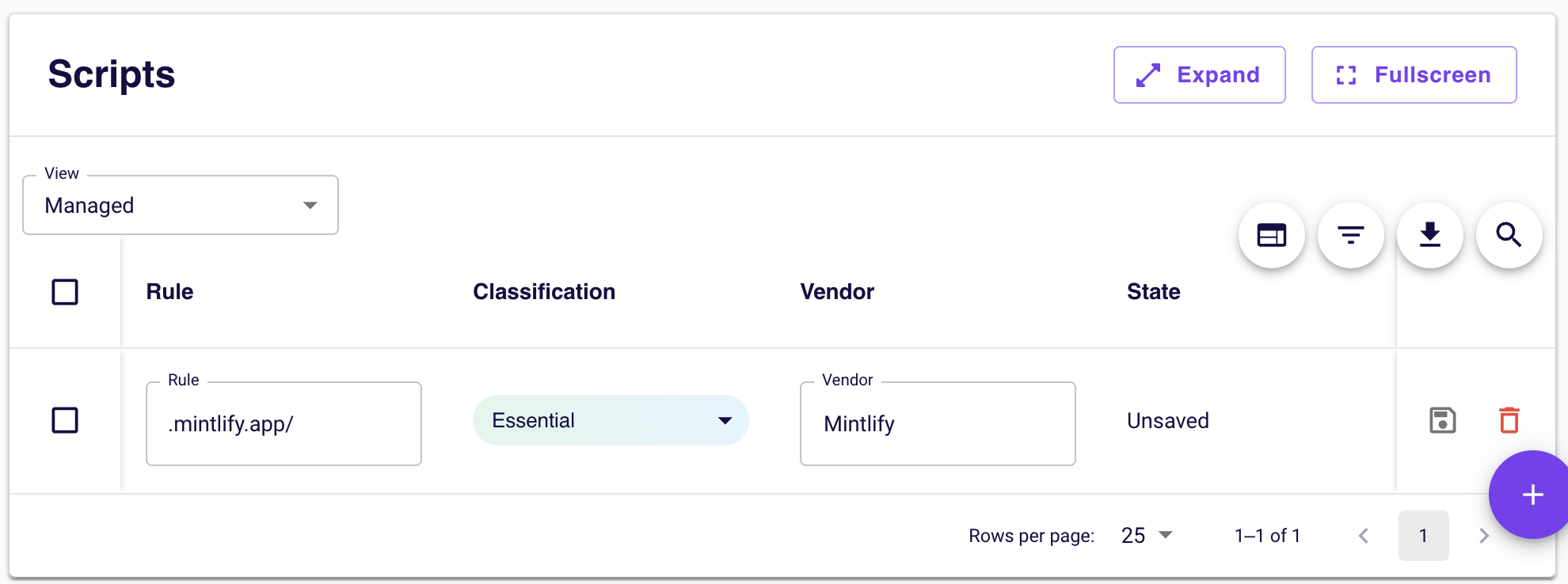 This ensures that all Mintlify-served assets (including images, stylesheets, and other documentation resources) are treated as essential and load even when Osano blocks uncategorized third-party content.