> ## Documentation Index
> Fetch the complete documentation index at: https://mintlify.manicule.dev/zh/llms.txt
> Use this file to discover all available pages before exploring further.
> For every page in one file, fetch https://mintlify.manicule.dev/zh/llms-full.txt (large).
> To search and read these docs as tools, connect the MCP server at https://mintlify.manicule.dev/api/mcp.
> Every agent surface: https://mintlify.manicule.dev/.well-known/llms-manifest.json
# Osano (/zh/integrations/privacy/osano)
Related: [隐私集成](/zh/integrations/privacy/overview.md), [Transcend](/zh/integrations/privacy/transcend.md)
> 将 Osano 集成到你的 Mintlify 文档站点,管理 Cookie 同意横幅、隐私偏好设置和监管合规要求。
通过在你的存储库中添加一个[自定义 JavaScript 文件](/zh/customize/custom-scripts#custom-javascript),为文档添加 [Osano](https://www.osano.com/) Cookie 同意管理功能。
## 设置
在你的文档存储库中创建一个名为 `osano.js` 的文件,并填入以下内容:
```js title="Format"
var script = document.createElement("script");
script.src = "OSANO_SCRIPT_URL";
document.head.appendChild(script);
```
```js title="示例"
var script = document.createElement("script");
script.src = "https://cmp.osano.com/your-tenant-id/your-site-id/osano.js";
document.head.appendChild(script);
```
将 `OSANO_SCRIPT_URL` 替换为你的 Osano 脚本 URL。你的脚本 URL 是 Osano 生成的代码片段中 `src` 的值。你的脚本 URL 始终以 `https://cmp.osano.com/` 开头,并以 `/osano.js` 结尾。
## 故障排查
如果在使用 Osano 的 **Strict** 合规模式时文档页面无法正常加载,你需要将 Mintlify 的 domain 加入允许列表,以允许图片和其他资源加载。
在 Osano 控制台中,进入 **Scripts** → **Managed Rules**。
将 `.mintlify.site/` 添加为一条 managed rule。
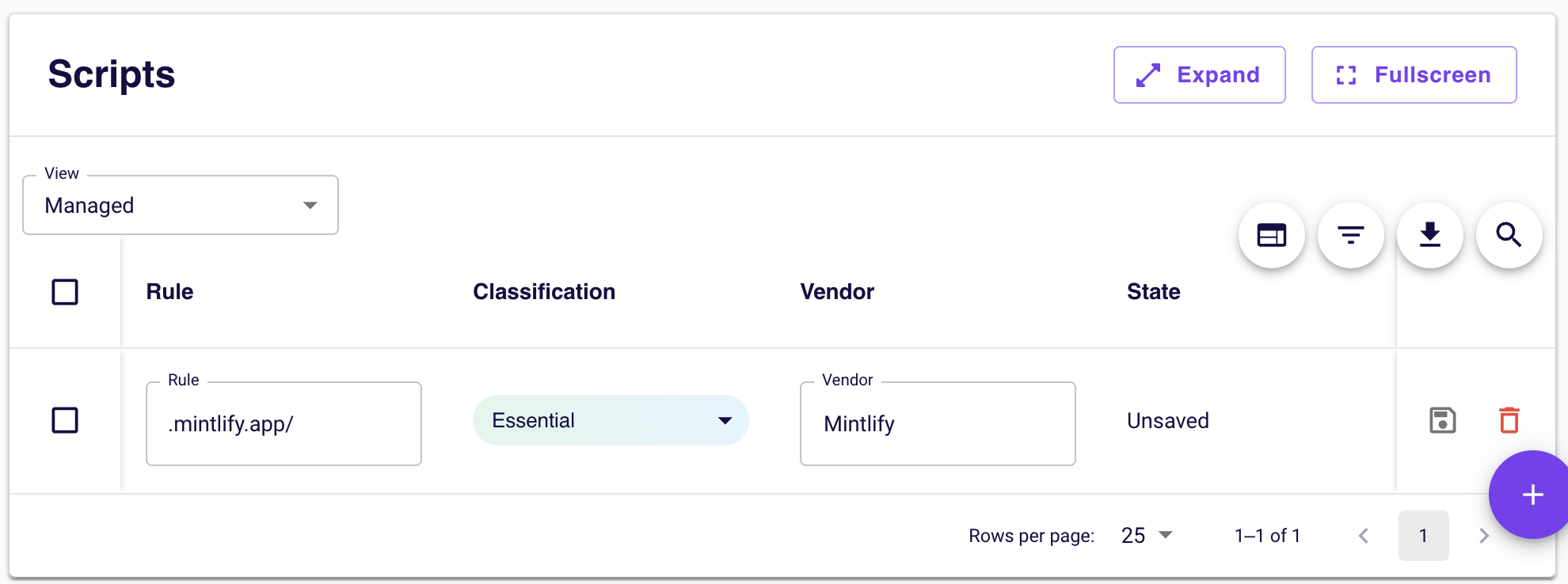 这可确保所有由 Mintlify 提供的资产 (包括图片、样式表和其他文档资源) 被视为必要内容,即使 Osano 阻止未分类的第三方内容时也会加载。